Desktop app for AI training data
Annova Annotation Platform
Label images and LiDAR point clouds on your own computer, with AI that does the first pass and a review workflow that keeps every label accountable. Runs fully offline, so your data never leaves your network.
Labelling is where AI projects slow down
Every model needs thousands of labelled examples. Teams draw them by hand, pass files between people over email and shared drives, and only find mistakes after the model has been trained on them. Cloud labelling tools help, but many projects cannot upload sensitive images or LiDAR scans to someone else’s servers.
One desktop app for the whole labelling job
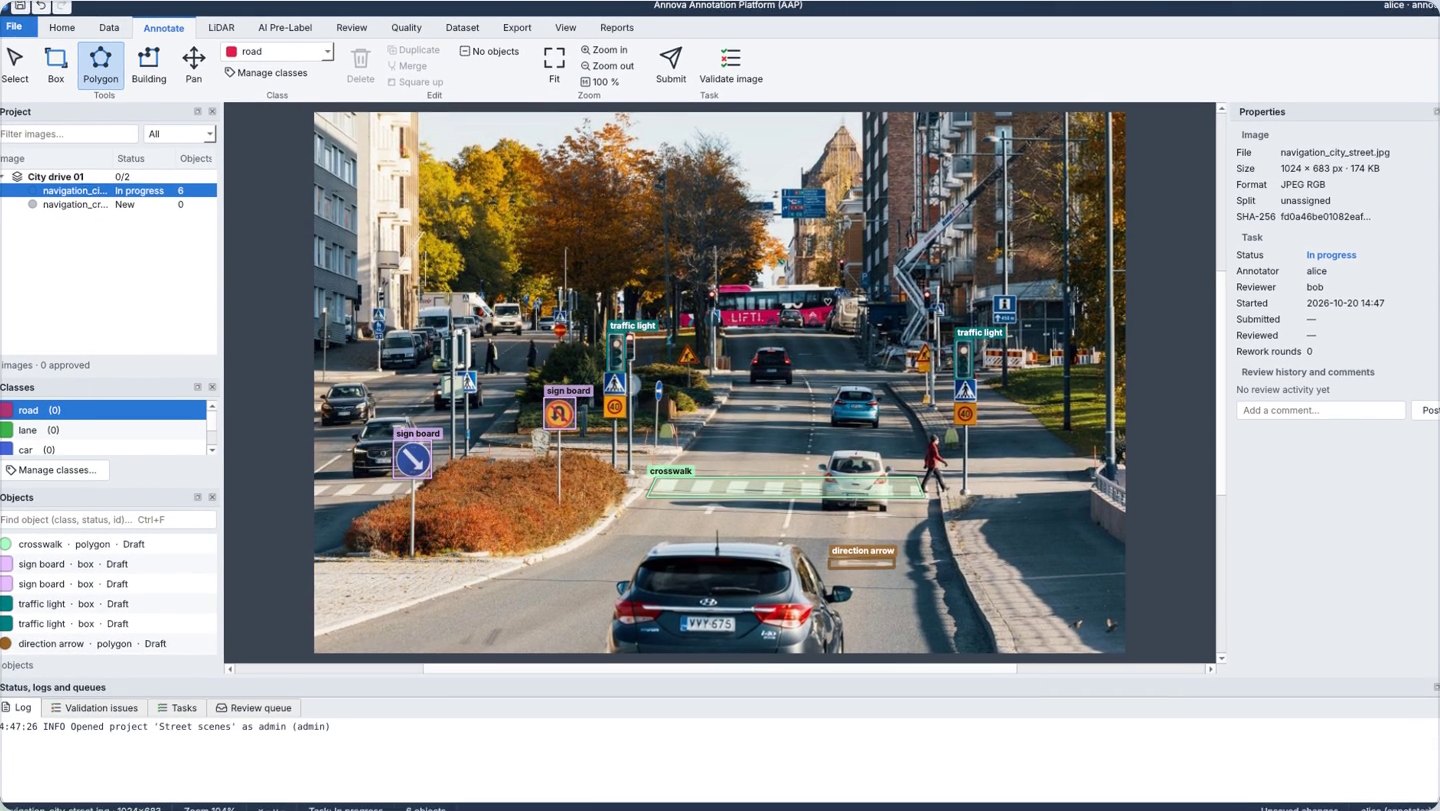
Annova Annotation Platform brings labelling, AI pre-labelling, team assignment, quality checks, review and export into one native app that runs on Windows, macOS and Linux. AI draws the first labels, people accept or correct them, and nothing is exported until it passes your quality rules.
Label faster. Ship better models.
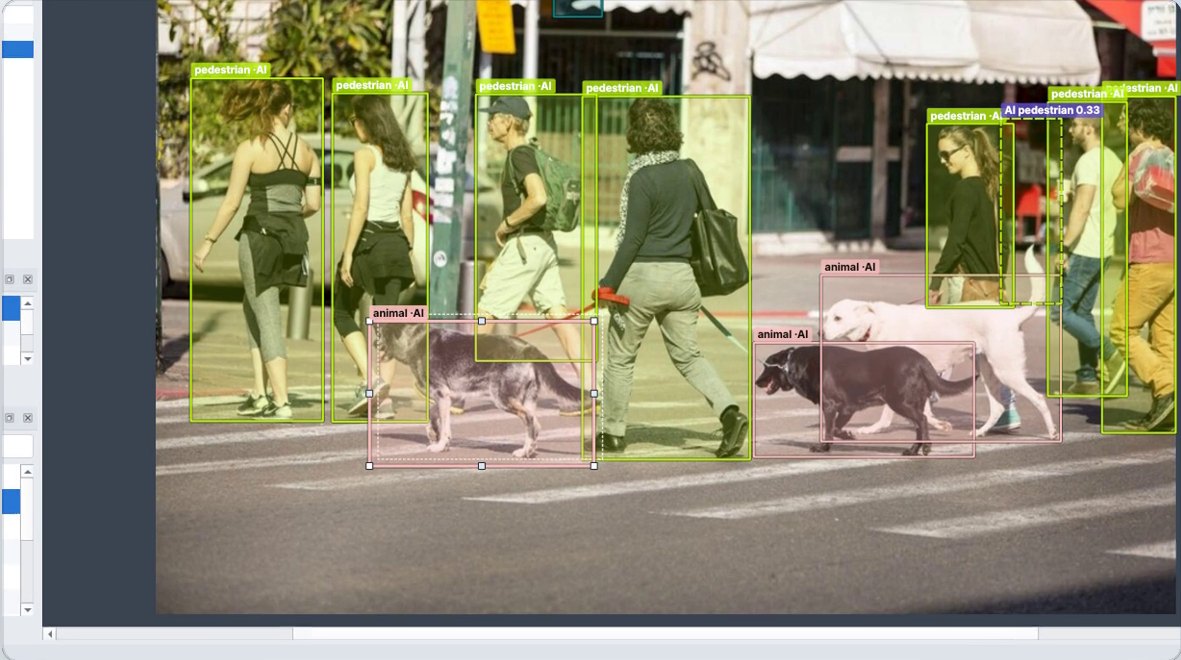
AI draws the first labels with confidence scores; your team accepts, rejects or corrects each one.

How it works
Set up in seconds
Pick an industry class template or make your own classes, then add your images or point clouds.
Assign work to your team
Give each task an annotator and a reviewer, by hand or round robin.
Let AI do the first pass
Auto-Detect and Auto-Segment draw boxes and precise masks for you to check.
Review and fix
Accept, reject or correct each label. Quality rules flag errors before anything is submitted.
Export training-ready data
Export to COCO, YOLO or KITTI with a manifest and checksums for every file.
See Annova Annotation Platform in action
What it labels
- Images: JPG, PNG, TIFF and more
- LiDAR point clouds: PCD, PLY, LAS, LAZ, KITTI .bin
- Boxes, polygons and masks
- 3D cuboids, fitted in one click
What you get
- COCO, YOLO and KITTI 3D exports
- Manifest with SHA-256 checksums
- Audit log of every change
- AI accuracy and team productivity reports

Why Annova Annotation Platform
AI does the first pass
Auto-Detect finds objects from a text prompt, Auto-Segment draws precise masks, and you can bring your own models. Everything runs locally on CPU or GPU.
You stay in control
Accept, reject or correct every AI label. The original is kept for comparison, and every object shows whether a person or the AI made it.
Gets smarter every round
The Platform suggests which images to label next, then trains a Custom Detector on your approved labels so each round needs less fixing.
Errors caught before export
Geometry and attribute rules run as you work. Unreviewed AI labels are flagged and errors block submit and export.
Review built into the flow
Assign, submit, approve or return with comments. A four-eyes rule and full history keep every label accountable.
Your data stays with you
A native desktop app that runs fully offline, with user roles (admin, manager, annotator, reviewer, auditor) and an audit log.
Every task at a glance
See progress and turnaround for every task, how often the AI’s labels are accepted, and how productive each person on the team is.

Use cases
- Autonomous vehicles and ADAS: road scenes and LiDAR
- Retail: shelf and product detection
- Agriculture: crops, weeds and livestock
- Construction: equipment, PPE and site safety
- Healthcare: medical images that cannot leave the hospital network
Who it’s for
AI and computer-vision teams, data labelling vendors and research groups who need high-quality training data and cannot, or would rather not, send it to the cloud.
Prefer us to do the labelling? See our image & video and LiDAR annotation services.
Frequently asked questions
Does my data leave my computer?
No. The Platform is a native desktop app that runs fully offline. Images, point clouds and labels stay on your machine or your own network storage.
Which file formats does it support?
Images such as JPG, PNG and TIFF, and LiDAR point clouds in PCD, PLY, LAS, LAZ and KITTI .bin. Labels export to COCO, YOLO and KITTI 3D.
How does the AI pre-labelling work?
Auto-Detect finds objects from a text prompt and Auto-Segment draws precise masks. You can also plug in your own detection models. Everything runs locally on CPU or GPU, and people accept, reject or correct every AI label.
Can my whole team work on one project?
Yes. Users get roles (admin, manager, annotator, reviewer, auditor), tasks are assigned by hand or round robin, and every task has an annotator and a reviewer with a four-eyes rule.
How do you make sure labels are correct?
Quality rules check geometry and attributes as you work, unreviewed AI labels are flagged, and errors block submit and export. Each export includes a manifest with checksums so you know exactly what was delivered.
Which operating systems does it run on?
Windows, macOS and Linux. On Windows it installs from a single package with no extra software to set up.
Can I try it before buying?
Yes. Book a demo or request a free pilot and we will set it up on a sample of your own data.
Read next
Bounding box vs polygon vs segmentation: which annotation type do you need?
A side-by-side comparison of the main image annotation types, with a simple decision guide so you do not pay for precision your model does not need.
LiDAR annotation: a complete guide to 3D point cloud labelling
3D cuboids, point cloud segmentation, multi-frame tracking and camera-LiDAR fusion, plus the mistakes to avoid and how to check quality.
Annotation quality metrics: how to measure training data accuracy
Label accuracy, IoU, precision and recall, inter-annotator agreement and QA sampling, explained for teams buying or running data annotation.
Ready to label faster?
Book a demo and we will walk you through the Platform with your own images or point clouds, or start with a free pilot.